Best GIF Settings for Sharing: Resolution, FPS, and Length
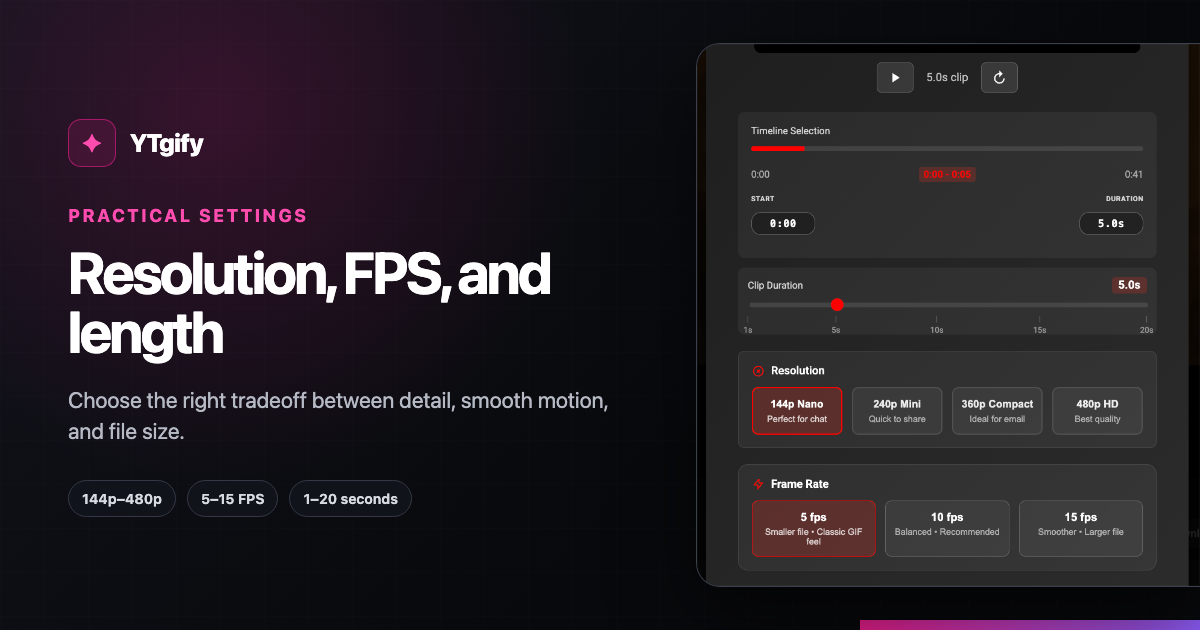
The best GIF setting is a tradeoff: more frames, pixels, and seconds can improve detail, but each one increases file size. In YTgify v1.0.19, you can choose 144p, 240p, 360p, or 480p, 5, 10, or 15 FPS, and a clip from 1 to 20 seconds.
The recommendations below are practical YTgify starting points, not official upload limits. Platforms change their limits, and workspaces or account tiers can differ.
Quick settings by sharing goal
For a local recording, try these tradeoffs in the browser video-to-GIF converter. Its file-size targets (5, 10, or 25 MB) automatically choose resolution and FPS within the browser memory budget and recalculate when you change the trim. The size range is a rough estimate: detail, motion, and captions change compression. Preview the finished GIF and check its actual size before sharing.
For example, start with a 3-second, 240p, 5 FPS reaction. For a screen recording with small text, try 480p at 10 FPS and keep the clip short. If the result exceeds your target, shorten it first or select lower resolution/FPS manually; manual choices turn off automatic targeting. The web converter supports 240p–480p and up to 10 seconds; the extension settings below differ.
| Sharing goal | Resolution | FPS | Clip length | Why start here |
|---|---|---|---|---|
| Lightweight chat reaction | 240p | 5 FPS | 2–3 sec | Prioritizes a small, quick-loading file. |
| Everyday social reaction | 360p | 10 FPS | 3–5 sec | A useful balance for motion and readable detail. |
| Fast motion or gesture | 360p | 15 FPS | 2–4 sec | More frames help motion, while short length controls size. |
| Text or interface detail | 480p | 10 FPS | 2–4 sec | More pixels help small visual details without maximizing FPS too. |
| Tiny sticker-like loop | 144p | 5 FPS | 1–2 sec | Uses the lowest-cost combination available. |
If a destination rejects the file, shorten it first. Duration usually gives you the biggest reduction without making each frame less legible.
Resolution: choose only the detail you need
- 144p is useful for tiny loops where detail is not important.
- 240p suits compact chat reactions and simple expressions.
- 360p is the best general starting point for faces, gestures, and most social sharing.
- 480p preserves more text and interface detail, but costs more bytes per frame.
Higher resolution does not improve a blurry source. Choose the lowest setting that keeps the subject understandable at the size people will actually view it.
Frame rate: spend frames on motion
- 5 FPS keeps files small and works for slower reactions or sticker-like loops.
- 10 FPS is a dependable default for ordinary movement.
- 15 FPS looks smoother during quick gestures, camera movement, or action.
Increasing FPS from 5 to 15 roughly triples the number of captured frames for the same duration. Use 15 FPS when the motion benefits—not simply because it is the largest option.
Duration: the strongest file-size control
YTgify v1.0.19 accepts a selection from 1 to 20 seconds, but the maximum is rarely the best sharing choice. Trim the setup and aftermath, and keep only the beat that makes the loop work.
A clean loop often follows this pattern:
- Start just before the recognizable action or expression.
- End as soon as that action resolves.
- Preview the transition from the final frame back to the first.
- Shorten again if a pause makes the loop feel sluggish.
A simple tuning order
When the first export is too large, change one control at a time:
- Shorten duration. Remove every fraction of a second that does not add meaning.
- Lower resolution. Try 480p to 360p, or 360p to 240p.
- Lower FPS. Try 15 to 10 FPS, then 10 to 5 FPS.
- Recheck legibility and motion. Stop as soon as the GIF is clear enough for its destination.
This order preserves clarity better than immediately dropping every setting to its minimum.
Three common mistakes
- Treating recommendations as platform rules. Check the destination's current upload message or help page when an exact limit matters.
- Using 480p and 15 FPS for a long clip. That combines all three file-size multipliers.
- Leaving dead time around the moment. Extra seconds add frames without improving the loop.
Put the settings into practice
Follow the complete YouTube-to-GIF workflow for installation and capture steps. If you already have a GIF that is too large, use the free GIF compressor and follow the step-by-step GIF compression guide. If privacy and clean export matter most, read how YTgify's local, no-watermark workflow works. You can also install YTgify from the homepage walkthrough.
Product sources
The available controls and ranges on this page were checked against the v1.0.19 Quick Capture screen and timeline control. The suggested combinations are editorial starting points, not official platform limits.